unblurryExchange
Restore old prints and family albums with AI
About unblurry
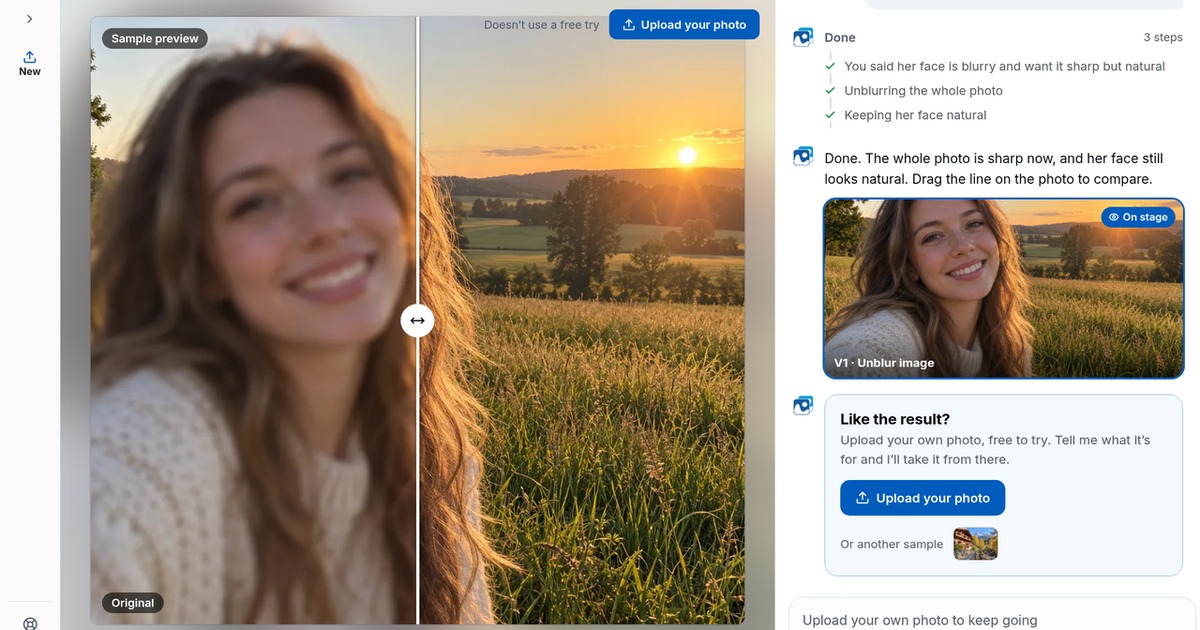
Faded, softened and creased prints are hard to share, and a phone scan of a family photo often comes out blurry. unblurry takes a JPG, PNG or WEBP scan of up to 25 MB, identifies the kind of softness in it, and reconstructs the detail that faded across faces and backdrops. A before-and-after slider compares the result with the original before you download it. The free Standard tier is watermarked and works without signing in. The site also offers old-photo restoration and colorizing, so an archive can be handled in one place.
At a glance
What it is
Restore old prints and family albums with AI
Pricing
Exchange
Primary category
Image Generation & Editing
Source code
Closed source / hosted
What to consider before using unblurry
unblurry is one of many tools in its category. Before committing to it, weigh a few practical points that tend to decide whether a tool actually fits your work:
- Match the tool to your real task, not to its feature count. A tool that excels at your specific job beats one with a longer checklist you will never use.
- Check how it fits your existing workflow — integrations, export formats, and whether the output needs heavy manual cleanup.
- Read the license and pricing terms for commercial use, especially if you plan to publish or resell what the tool produces.
We describe unblurry and its alternatives honestly so you can compare on substance. Browse the similar tools below to see how it stacks up against other options in the same category.